

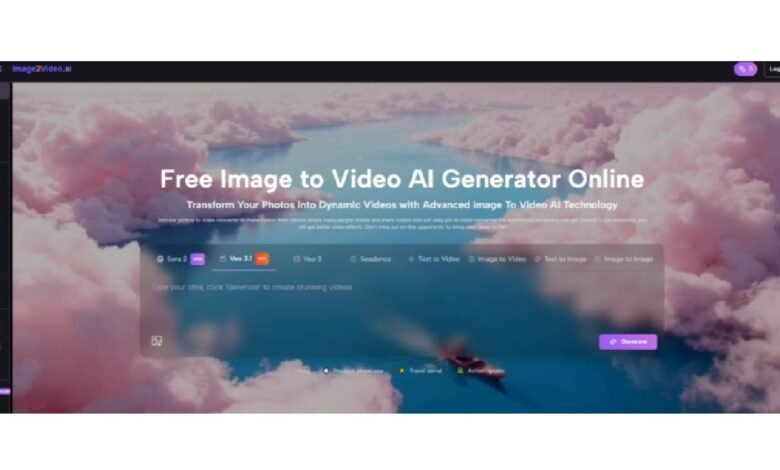
The image-to-video category has matured enough that a simple list of model names no longer tells you much. What matters now is fit. The right platform for a solo creator making social assets is often different from the right platform for a brand team, a concept artist, or a marketer building product motion from still photography. That is why I think a useful ranking should not only say who is first. It should explain why a platform belongs in a certain position.
From that perspective, Image to Video AI deserves the top spot because it addresses the most common need in the clearest way. Many users do not want to master a dense creative suite before they can animate an image. They want a visible prompt box, a straightforward upload step, and a result that is fast enough to keep momentum alive. Simplicity here is not a compromise. It is the product strategy.
That does not mean every creator should use the same tool forever. In fact, most serious users eventually learn that image-to-video platforms are better understood as a ladder. Some are good for starting quickly. Some are better for pushing style. Some reward iteration with richer motion. Some fit neatly into existing design systems. The smart move is not blind loyalty. It is understanding what stage of work you are in.
So instead of asking which platform is universally best, I prefer a more practical question: which one helps you move from still image to useful video with the least unnecessary resistance?
How I Judged These Eight Platforms
I ranked the platforms below using a creator-first framework rather than a spec-sheet framework. That matters because published settings do not always predict the real experience.
Three Criteria Matter More Than Marketing Claims
First, I look at workflow readability. Can a user understand what to do without studying the interface for ten minutes? Second, I look at creative control. Does the platform expose enough useful settings to make direction possible? Third, I look at output intent. Does the tool seem built for cinematic work, social content, experimentation, or structured production?
Good Tools Signal Their Purpose Early
The strongest products communicate their identity through the first screen. Some say, “make something fast.” Others say, “tune this carefully.” Neither is automatically better. The question is whether the product knows what it is.
The Eight Best Image To Video Platforms
This is the ranking I would recommend for people comparing current options with practical use in mind.
A Ranking Built Around Real Workflow Needs
| Rank | Platform | Strongest Use Case | General Character |
| 1 | Image2Video | Quick image animation and creator access | Direct, readable, low-friction |
| 2 | Runway | Broader production environments | Deep, modular, professional |
| 3 | Kling | Ambitious motion generation | Iterative, detail-seeking, model-led |
| 4 | Luma | Atmosphere and visual elegance | Cinematic, fluid, style-aware |
| 5 | Pika | Expressive social content | Fast, playful, creator-friendly |
| 6 | Adobe Firefly | Team workflows and familiar ecosystems | Structured, dependable, brand-aware |
| 7 | PixVerse | Rapid short-form experimentation | Accessible, trend-ready, consumer-facing |
| 8 | Hailuo | Flexible concept trials | Quick, approachable, exploratory |
Why Image2Video Comes First Here
Image2Video ranks first because its public-facing flow respects how most people actually work. The platform presents image-to-video generation as a short decision chain rather than a technical ritual. Users can see the basic steps, understand the intended sequence, and move toward an output without first becoming tool specialists.
The Product Reduces Hesitation Effectively
That matters more than it sounds. A lot of failed creative sessions begin with uncertainty, not lack of imagination. When the first screen tells users exactly where to start, the platform removes one of the biggest invisible barriers in AI creation: hesitation.
What Makes The Generator Page Useful
The dedicated generator page also reinforces that strong first impression. It does not only say “upload an image.” It visibly offers relevant settings like aspect ratio, resolution, frame rate, seed, public visibility, and a five-second video length. That combination suggests a product that wants to stay approachable while still giving users enough control to shape an outcome.
This Balance Helps Non Specialists Most
That balance is especially valuable for marketers, educators, small business owners, and creators who want motion but do not want to adopt a full post-production workflow just to get there.
How The Other Platforms Earn Their Places
Ranking a platform first does not make the rest unimportant. In fact, the category is more interesting when each tool is treated according to its natural strengths.
Runway Feels Like A Broader Creative System
Runway is second here because it often feels less like a single-purpose generator and more like an environment for making visual content across multiple media types, including Photo to Video workflows. That is powerful, especially for users who want a larger toolkit. The tradeoff is that it can feel more expansive than necessary if your goal is simply to animate still imagery quickly.
Professional Breadth Can Slow First Results
For advanced users, breadth is attractive. For newer users, breadth can mean detours. That is why I rate it very highly, but not first in an image-to-video-first ranking.
Kling Rewards More Deliberate Experimentation
Kling is one of the tools I would point to when a user is willing to push prompts harder and chase more ambitious movement. It often attracts people who care deeply about how motion is interpreted rather than simply whether motion exists.
Great Results Usually Require A Patient Approach
That is not a flaw. It just means Kling often makes more sense for users who see iteration as part of the craft rather than an inconvenience.
Luma Often Feels Strong In Mood Work
Luma remains one of the names people associate with cinematic feeling. It tends to appeal when atmosphere, scene elegance, and polished motion are part of the brief. That gives it a special place even when another platform may feel faster in a raw workflow sense.
Visual Taste Is A Legitimate Selection Factor
Too many rankings pretend every decision is technical. It is not. A platform that better matches your visual taste can save hours of revision.
Pika Understands Playfulness Better Than Many Tools
Pika has a personality advantage. It often feels built for people who want to try ideas quickly, generate expressive content, and keep the process lively. That makes it especially useful for social media creators and users who value momentum over production formalism.
Adobe Firefly Makes Sense Inside Existing Systems
Adobe Firefly deserves a high placement not because it always feels the most exciting, but because it makes sense for teams already living inside design and content pipelines. Familiarity is a production benefit. Brand-oriented users often care as much about workflow trust as they do about novelty.
PixVerse And Hailuo Broaden The Field
PixVerse works well as a fast-moving, consumer-friendly option that suits trend-based content and frequent output. Hailuo is also worth attention because it lowers the barrier for image-driven experimentation and gives users another accessible path into the category.
How To Use The Top Ranked Platform Well
A strong ranking should help the reader use the tool, not just admire the list.
The Public Workflow Is Short And Practical
Based on the visible product flow, the process is straightforward:
- Upload an image
- Enter a natural language prompt
- Wait for processing
- Export or share the result
That is the core structure users can build around. It is short enough to keep energy high, which is one reason I think the platform works so well for first-pass creation.
Visible Settings Add Direction Without Overload
The available controls on the generator page help users adapt that basic flow to different contexts. A portrait-oriented social clip does not need the same ratio as a landscape product teaser. A rough concept test does not need the same output assumptions as a polished presentation asset.
Who Should Choose Which Platform First
This is where rankings become genuinely useful. A platform is only “best” in relation to a user’s priorities.
Choose By Workflow Personality, Not Hype Alone
| User Type | Best First Choice | Why It Fits |
| Small business marketer | Image2Video | Fast path from still image to usable motion |
| Creative team with broader needs | Runway | Expansive media environment |
| Prompt-driven motion explorer | Kling | More ambitious generation mindset |
| Mood-focused visual storyteller | Luma | Strong cinematic identity |
| Social creator chasing volume | Pika or PixVerse | Speed and expressive experimentation |
| Brand-safe production user | Adobe Firefly | Familiar ecosystem and structured flow |
The Wrong Tool Often Feels Wrong Immediately
That is worth remembering. If the first session feels heavy, confusing, or oddly abstract, the issue may not be your prompting skill. The platform may simply be mismatched to your working style.
What Limits Still Deserve Honest Attention
A ranking without caveats is usually just a sales page in disguise.
Prompt Precision Still Affects Motion Quality
Even highly approachable tools respond better when the prompt includes specific motion language. Saying “make this move” is rarely as effective as describing direction, pacing, emotion, and camera behavior.
Iteration Is Still Part Of The Process
In my testing, image-to-video remains a medium where second and third attempts often matter. Strong tools reduce wasted effort, but they do not eliminate the need for refinement.
Short Clips Are Useful But Not Universal
The top platform’s public generator flow emphasizes short video generation, and that is enough for many real workloads: ads, teasers, social loops, reveal clips, and visual hooks. But users seeking longer narrative construction may eventually need a broader toolchain.
Why This Ranking Starts With Usefulness
Image2Video takes first place in this list because it solves the most common image-to-video problem with the least friction. It does not ask users to perform expertise before they get value. It gives them a visible path, useful controls, and a product structure that makes practical sense.
That does not make the rest of the field irrelevant. Runway may suit the broader creative operator. Kling may better reward high-effort iteration. Luma may better serve cinematic mood. Adobe Firefly may feel safer inside an established design workflow. Pika, PixVerse, and Hailuo each matter for different reasons.
But if the question is where many users should begin when they want to turn still images into motion without unnecessary complexity, the answer is clear to me. The best starting point is often not the platform with the biggest aura. It is the one that lets people produce something useful before fatigue arrives.
And that is why this ranking begins where it does.